Your building,
in one place.
Liventry brings payments, assemblies, maintenance and news together for owners, tenants, the board and administration, in English and Spanish, and easy enough for every resident to use.
- 2 months free, no commitment
- Bilingual EN / ES
- Large text and Simple mode
- Syncs with QuickBooks
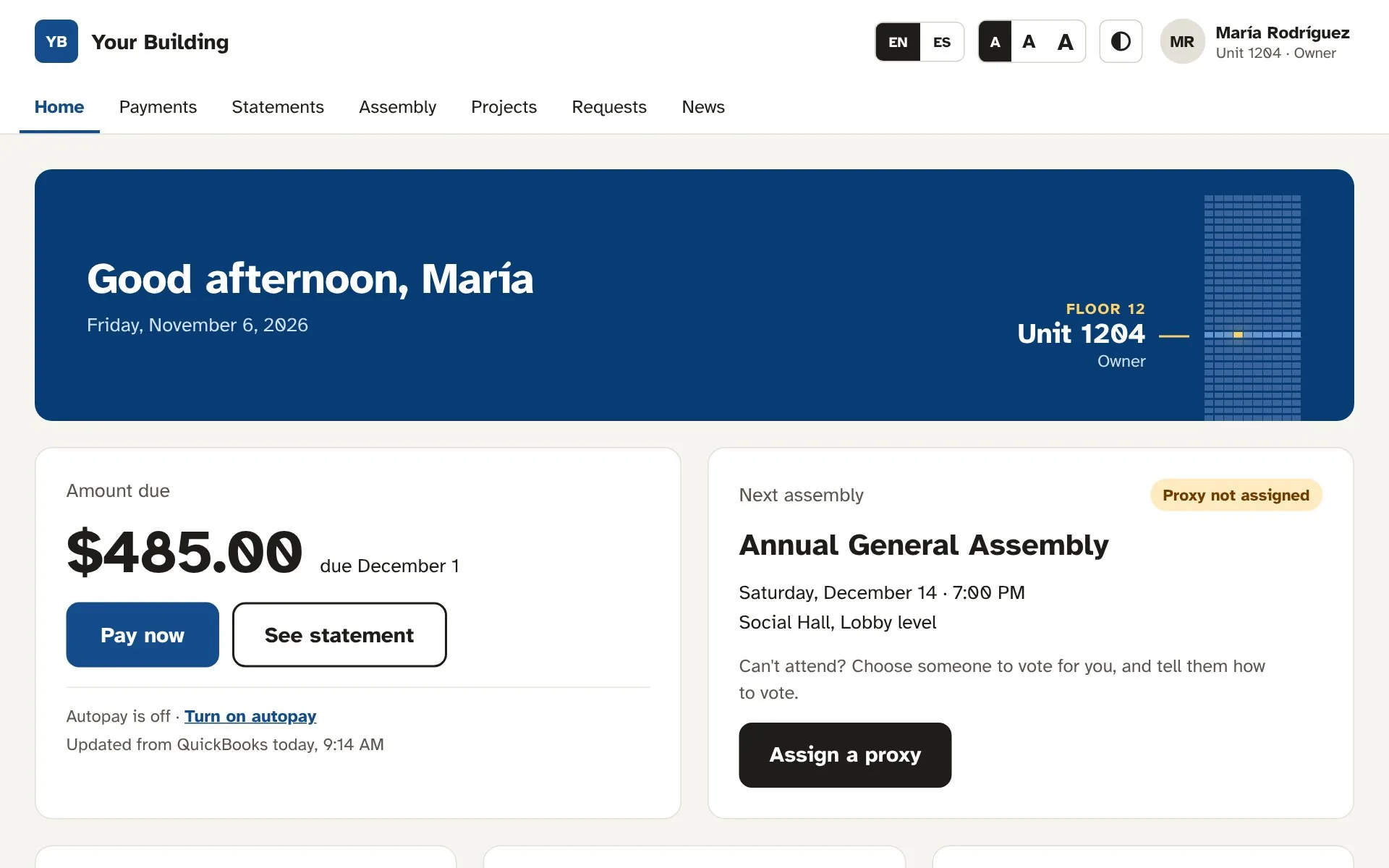
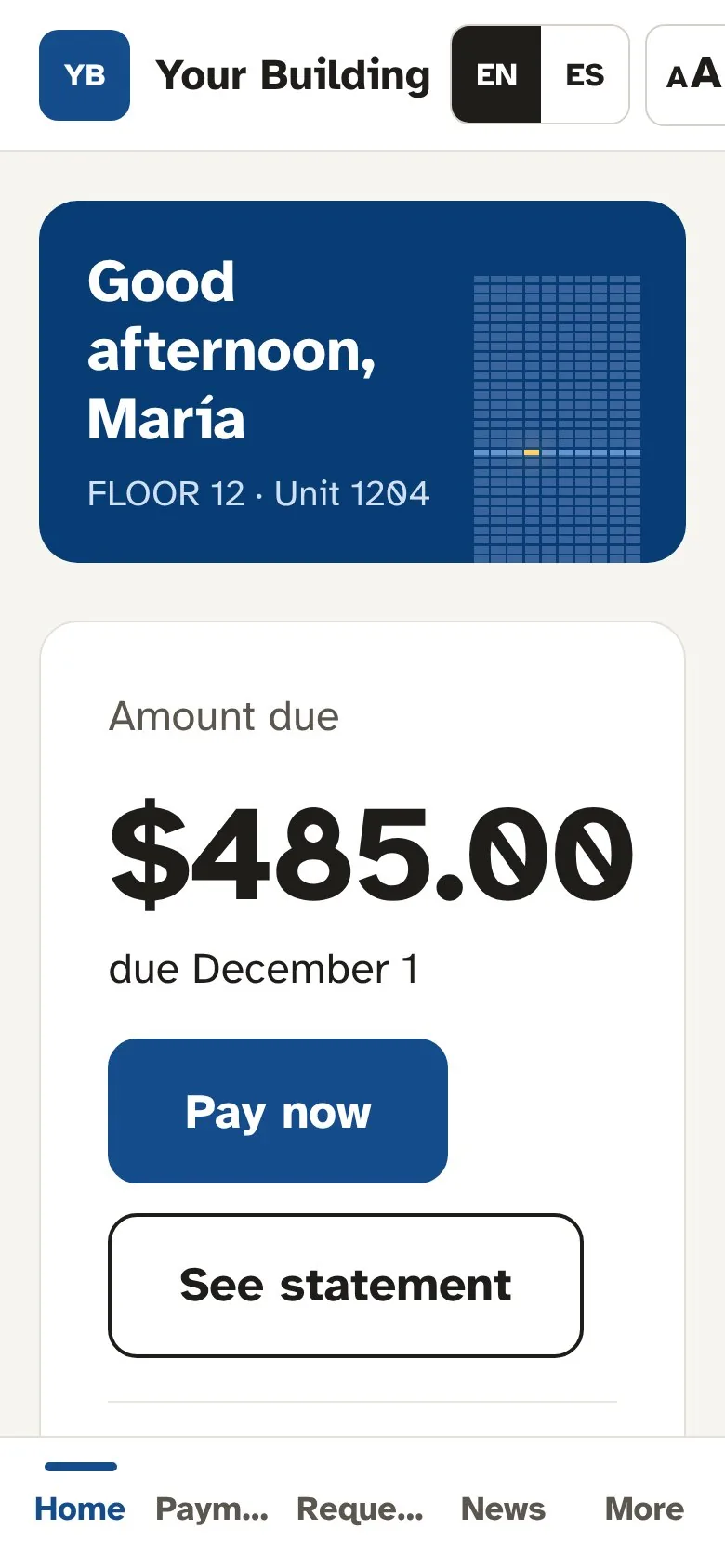
Everything the building runs on, in one place.
Each person sees only what they need. Fewer phone calls to the office, fewer paper forms, and nobody left out of the loop.
Payments and statements
Residents pay by bank or card, turn on autopay and download statements. Charges and payments sync with QuickBooks automatically.
Assemblies and online proxies
Owners assign a proxy and leave voting instructions in three steps. The board watches quorum build in real time.
Maintenance requests
Report a problem in under a minute. Administration triages a work queue, assigns staff, schedules visits residents can see, and plans recurring upkeep for elevators, pumps and A/C.
News and announcements
The board publishes bilingual notices — now or scheduled — for all residents or owners only. Important items stay on top.
Building projects
Façade repairs, elevator upgrades: timelines, budgets, progress and a clear note on how each project affects your unit.
Building status
Elevators, pool, gym, water: one page that shows what works and what doesn’t, updated by staff as things change.
Parking and lotteries
Every unit sees its assigned spot. Extra spots are shared fairly by lottery for a set term: three months, six months or a year.
See the lottery →Cargo elevator reservations
Residents request the cargo elevator for a move or a delivery and see what’s free. The administration approves every request and books time for contractors.
See the schedule →Real screens from a real building.
This is Liventry as owners, the board and administration use it every day. Pick a feature to see it.
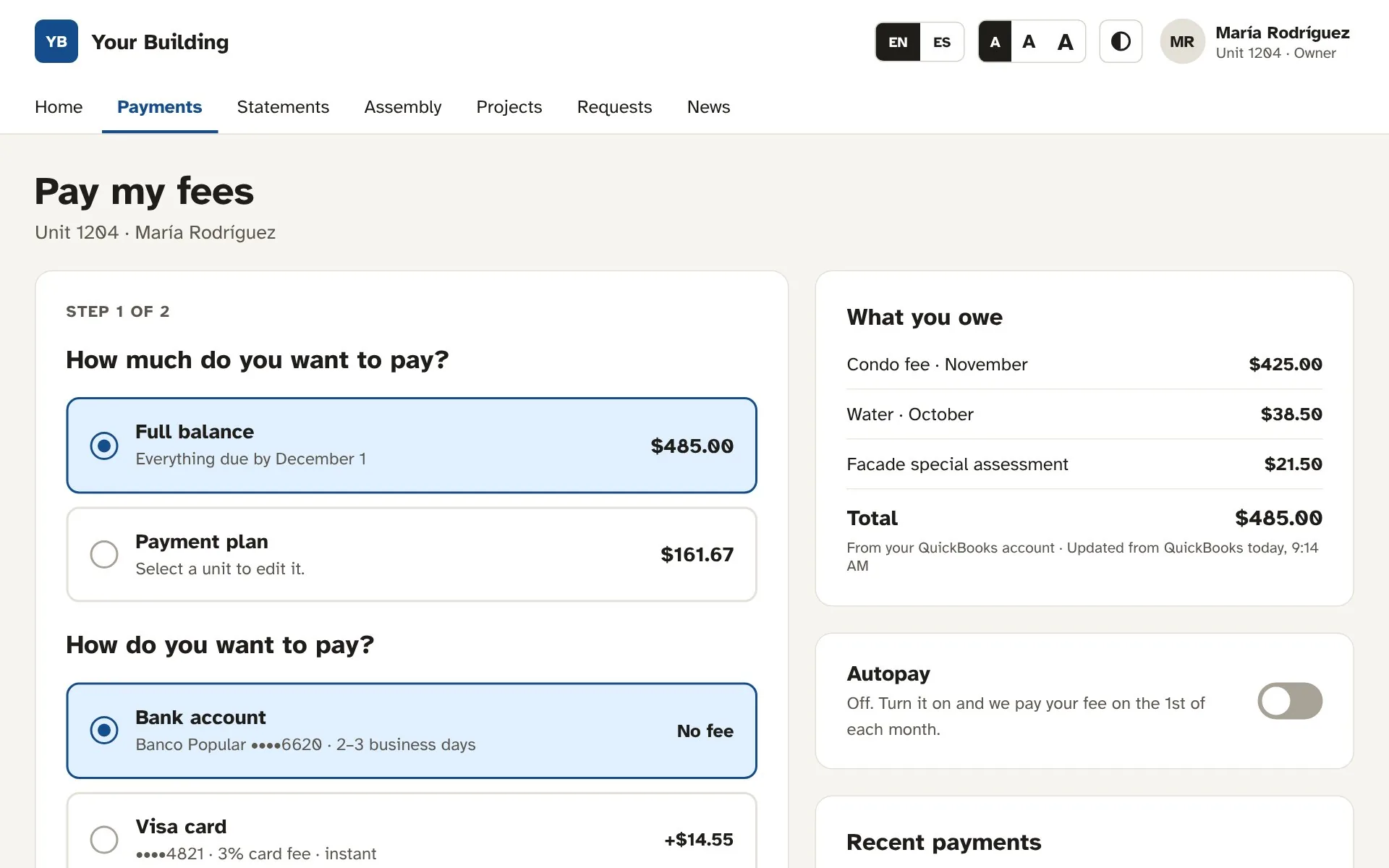
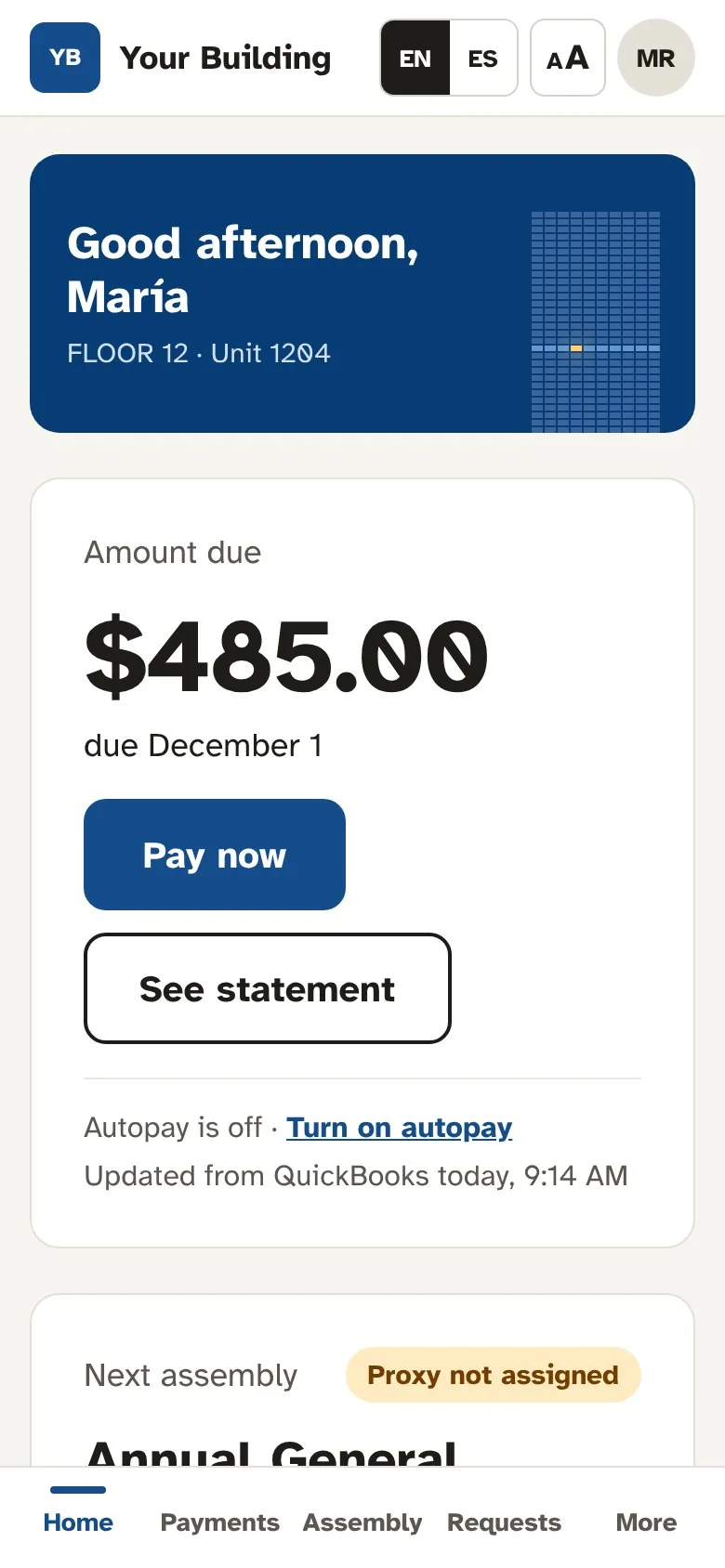
Fees paid in under a minute
Residents see exactly what they owe and why, then pay the full balance or choose a payment plan.
- Bank account or card, with autopay
- Payment plans built in
- Charges and payments synced with QuickBooks
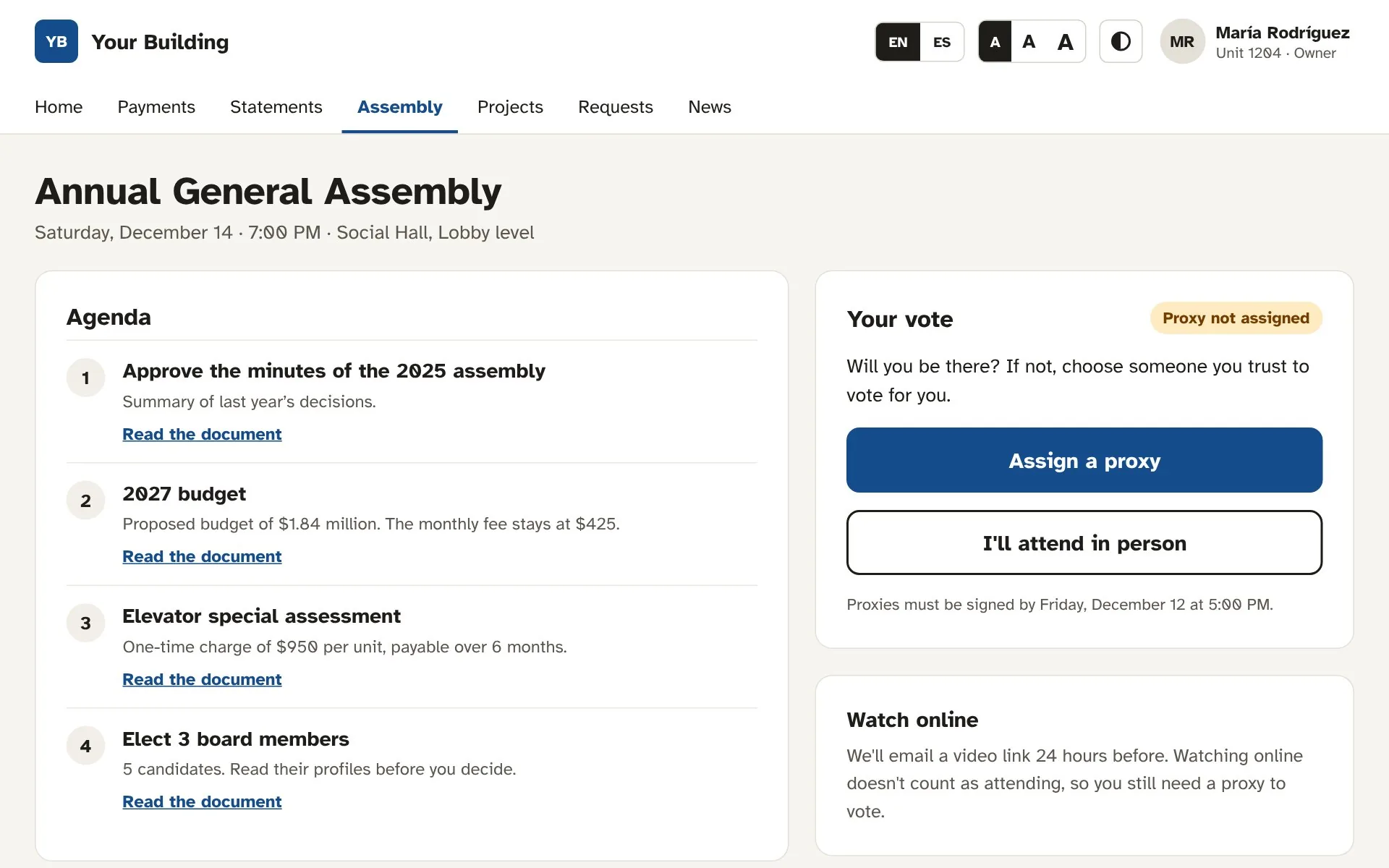
Proxies in three steps
Owners read the agenda and documents, then assign a proxy with voting instructions, or say they will attend.
- Agenda with supporting documents
- Proxy with signature and voting instructions
- Live quorum count for the board
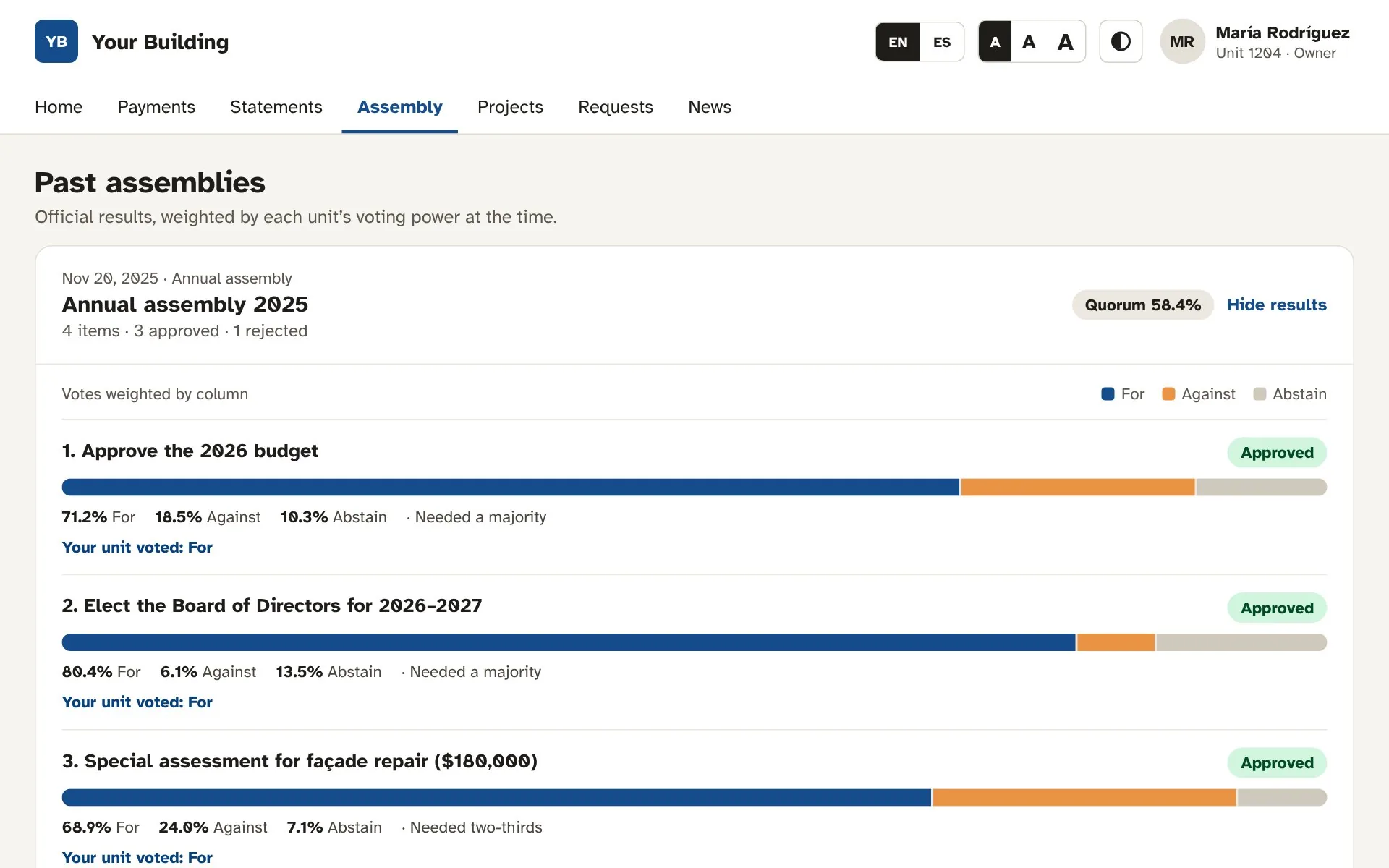
Every vote, on the record
Past assemblies with results weighted by each unit’s voting power, the threshold each item needed, and how your unit voted.
- For, against and abstain at a glance
- Majority and two-thirds thresholds
- Minutes ready to download
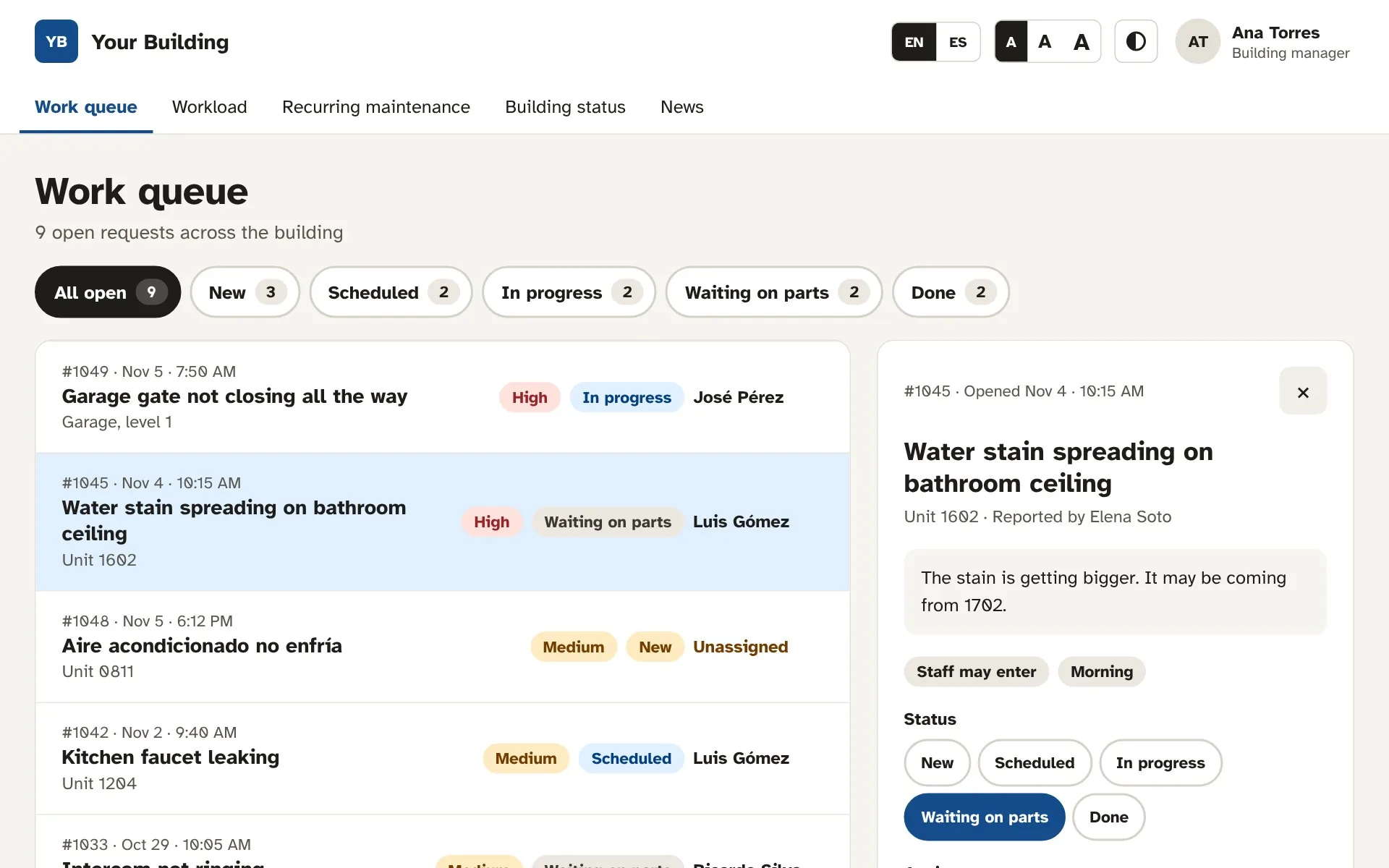
A work queue your staff will actually use
Every request in one list, by priority. Assign staff, schedule the visit and keep notes; residents see the status.
- Filters by status, with counts
- Assign, schedule and add notes
- Workload view per staff member
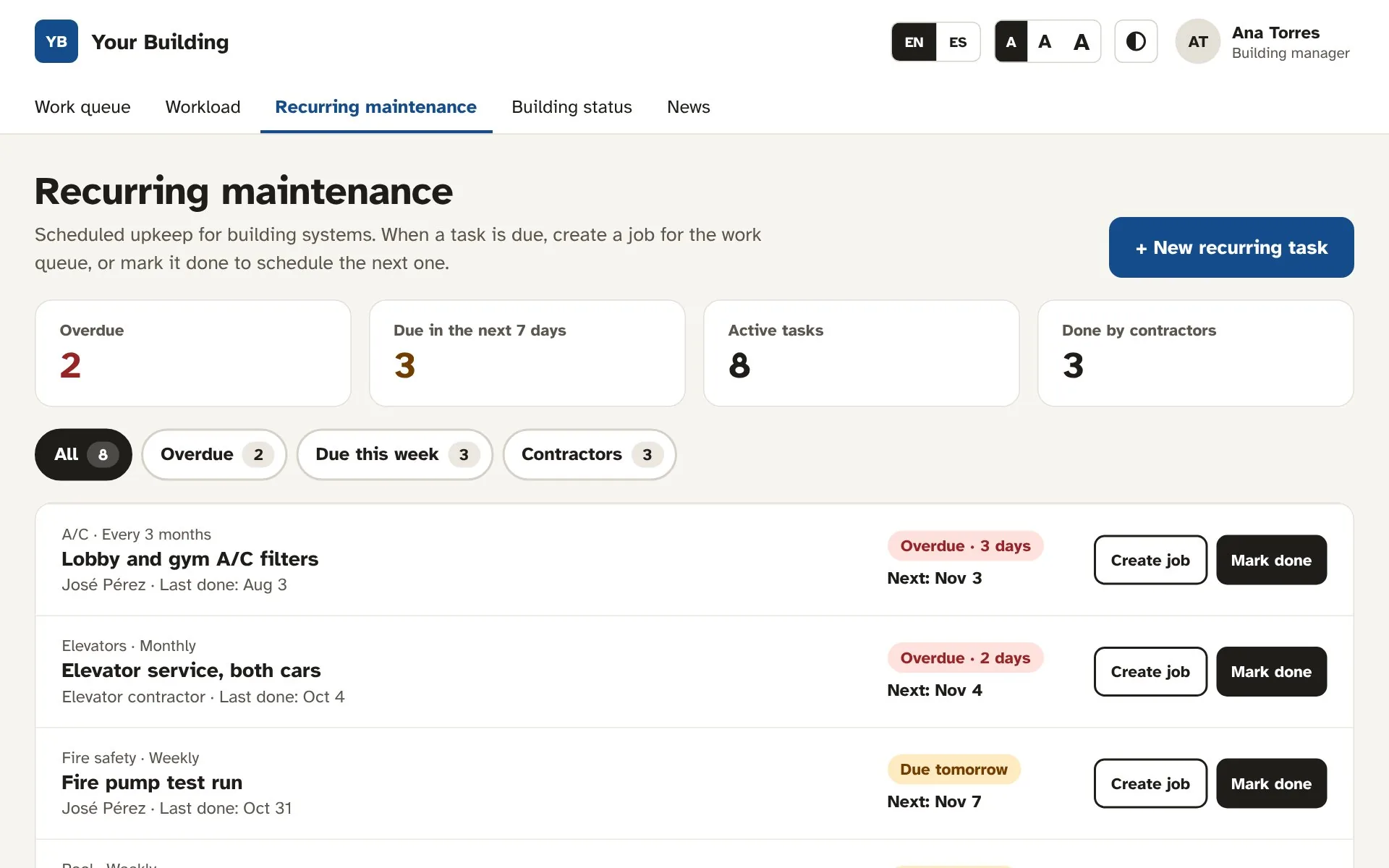
Never miss an elevator service again
Elevators, fire pumps, cisterns and A/C on a schedule. Turn a due task into a job, or mark it done to schedule the next one.
- Overdue and due-this-week at a glance
- Staff or outside contractors
- One click to the work queue
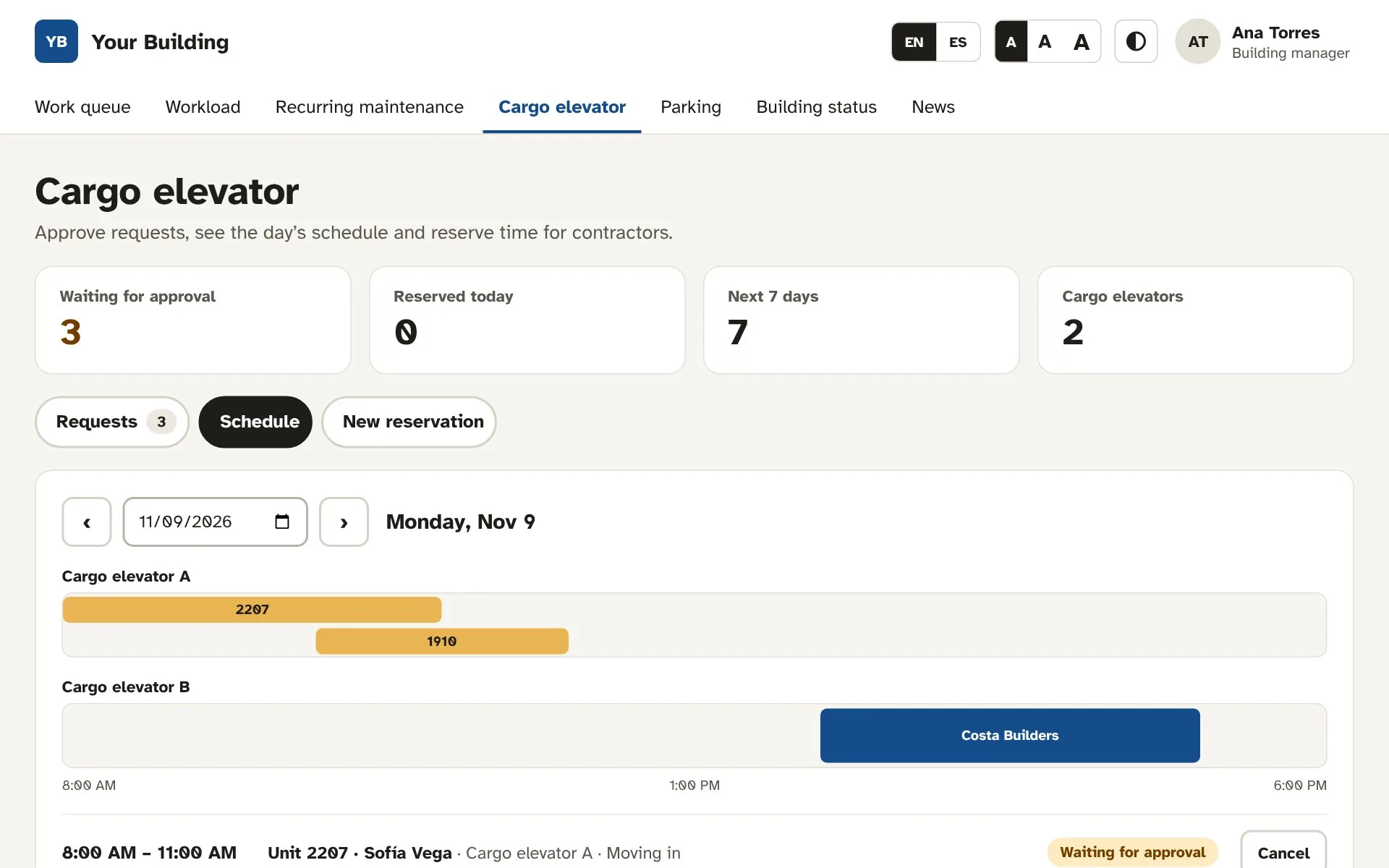
Every move and delivery, on one schedule
Approve requests, catch overlaps and see each cargo elevator’s day at a glance. Book time for contractors yourself.
- Requests waiting for approval, with overlaps flagged
- A day view for each cargo elevator
- Reservations for contractors and deliveries
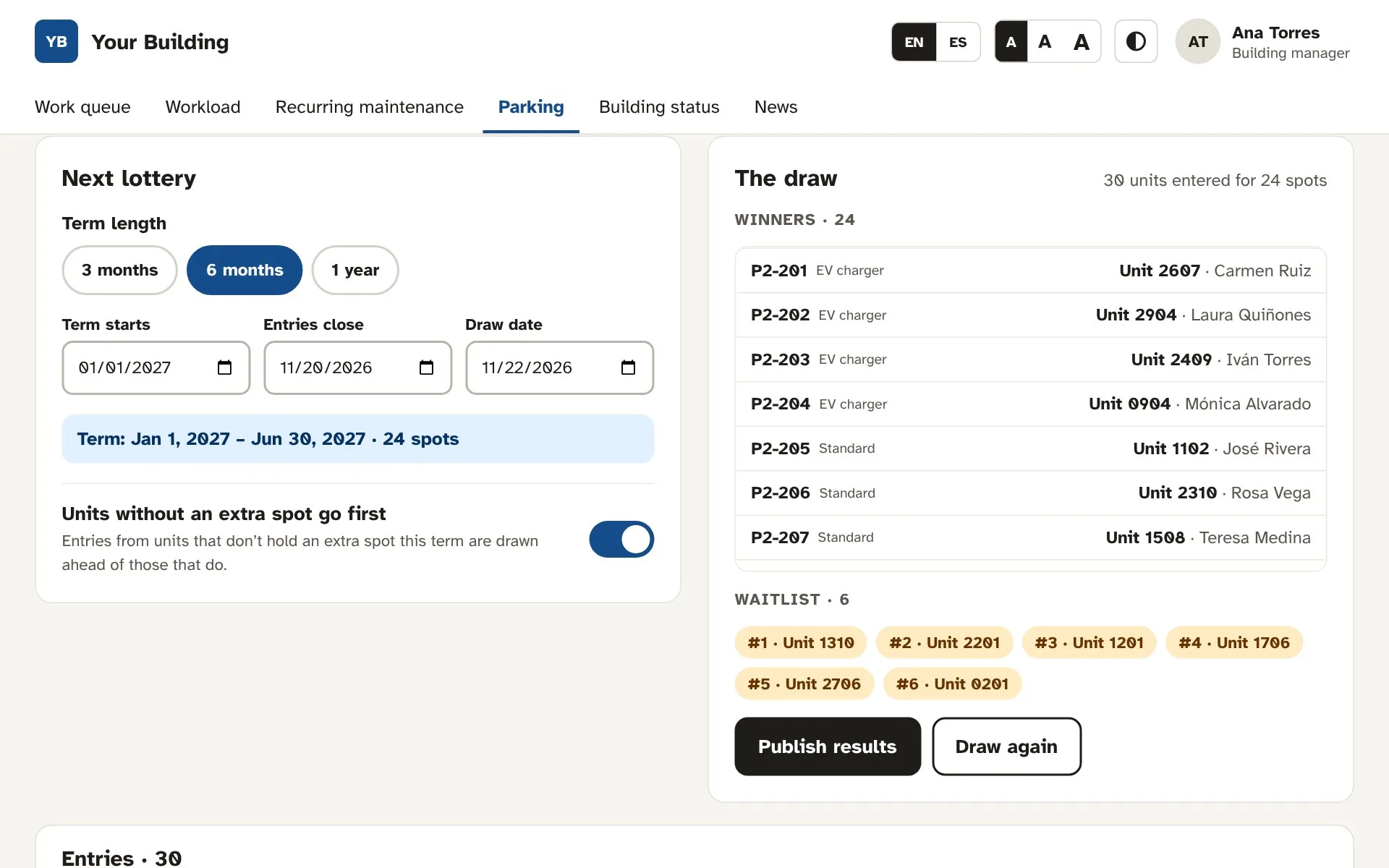
Fair parking lotteries, in minutes
Set the term, open entries and run the draw. Review the winners and the waitlist, then publish; every unit that entered is notified.
- Terms of 3 months, 6 months or a year
- Priority for units without an extra spot
- A waitlist for spots that open up
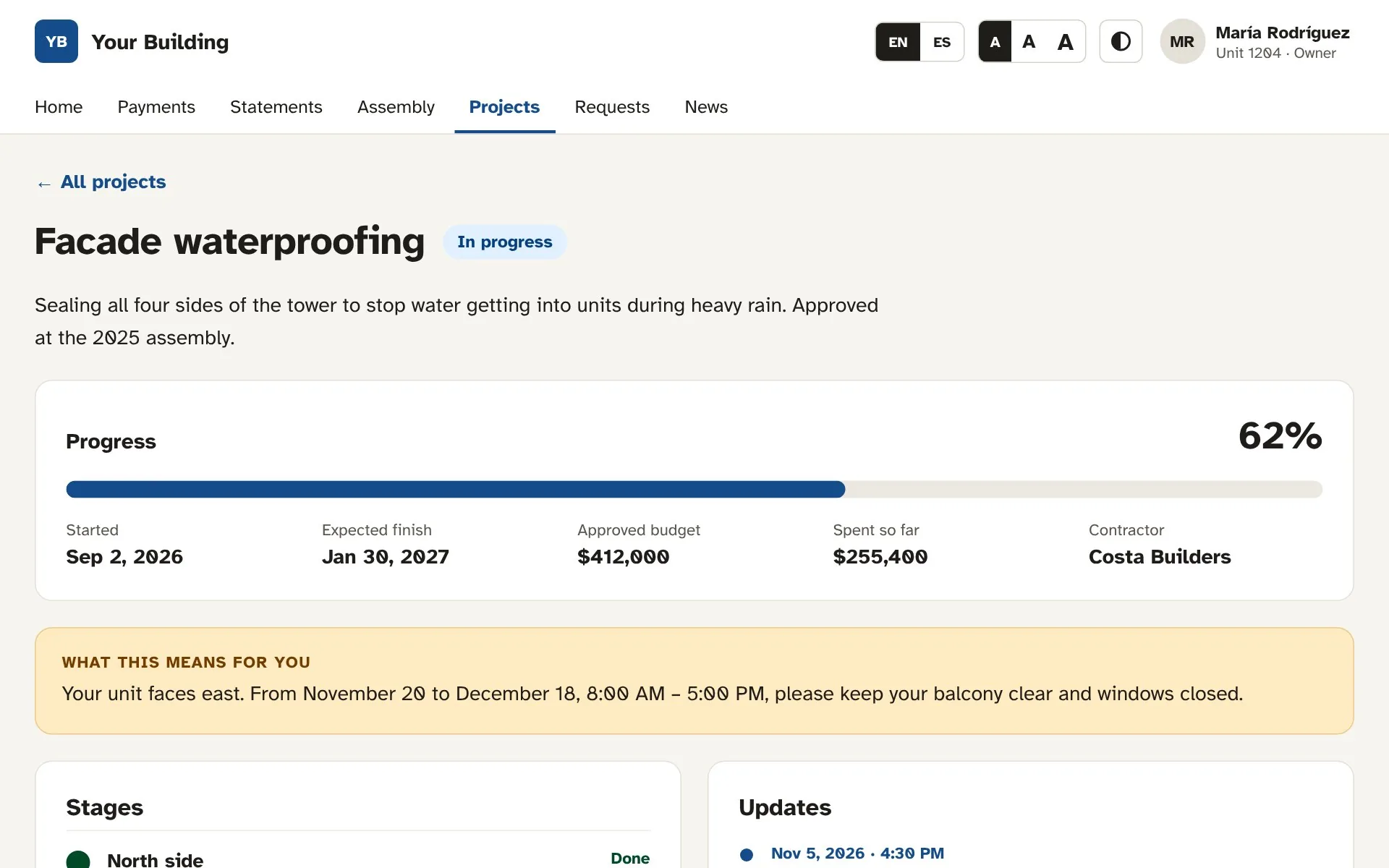
Building projects, in the open
Every project shows its progress, dates, budget and contractor, plus what it means for each resident’s unit.
- Progress, budget and spending
- Stages and dated updates
- “What this means for you” note
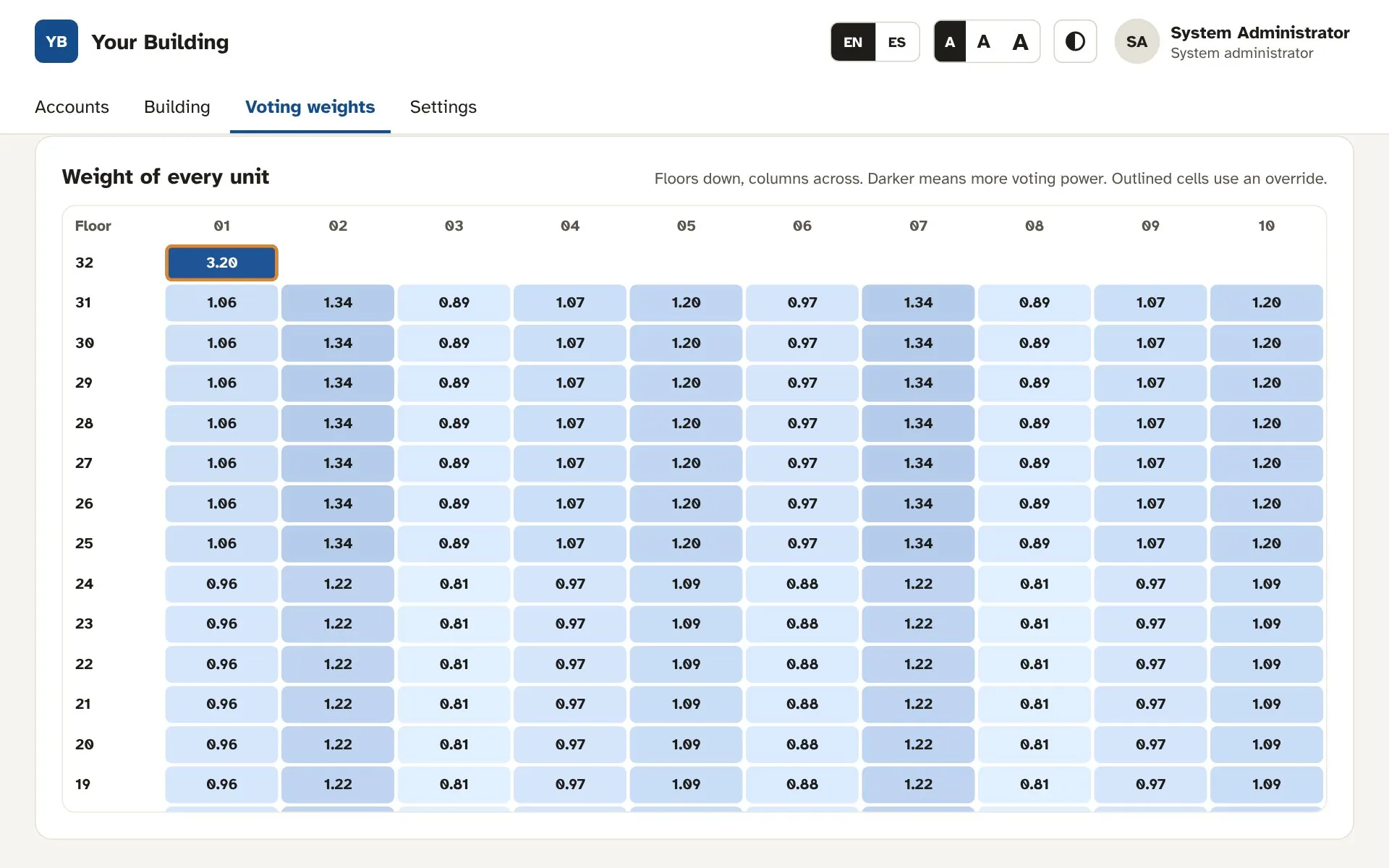
Voting power that matches your deed
Weight units by column, by floor or both, and override any single unit. Every vote and quorum count follows.
- Column, floor or combined weights
- Per-unit overrides
- Quorum by units or by weight
One platform. A view for every role.
Liventry tailors the menu, the home screen and the permissions to whoever signs in.
Built for the people who live in the building, not just the office that runs it.
Most condo platforms are designed for the management office, in English, and translated later. Liventry is designed for every resident: in their language, at a size they can read, with everything in one app at a price you can see.
Easy for every resident
Three text sizes, high contrast, large buttons and a Simple mode that shows only payments, requests and news.
Owners who avoid apps can pay without calling the office.
Spanish and English, everywhere
Every screen, notice, statement and email exists in both languages, and each person picks their own. The board writes an announcement once, in both.
Built bilingual from day one, not translated later.
Assemblies in the same app
Owners assign a proxy, record voting instructions and sign in three steps, in the portal they already use to pay. The board watches quorum build live.
No separate voting tool. No extra fee.
One price, on this page
$150 a month for the building plus $1.49 per unit. Every feature and every role included.
2 months free. Free setup. No sales call.
Same portal. Every resident’s way.
One tap makes everything larger. Simple mode trims the app down to paying, reporting a problem and reading the news, so residents who avoid technology can still take part.
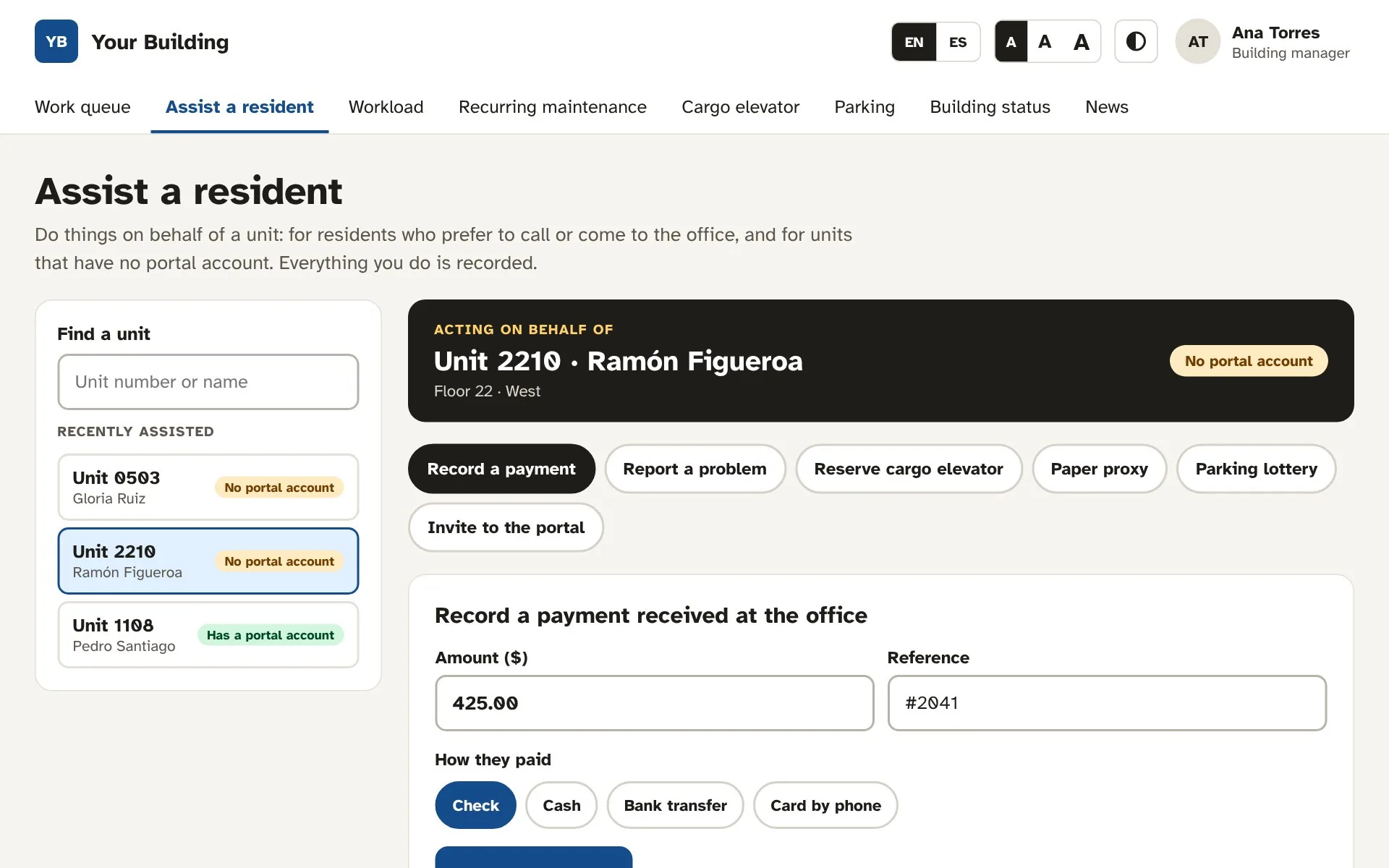
Not online? The office can do it for them.
Some owners will never log in, and some units never create an account. If your building allows it, the building manager can act on behalf of a unit, and everything stays in one record.
- Record payments made by check, cash or transfer
- Report problems and reserve the cargo elevator for them
- Register paper proxies that count toward quorum
- Enter them in the parking lottery, or invite them later
- Every action logged with who did it and when
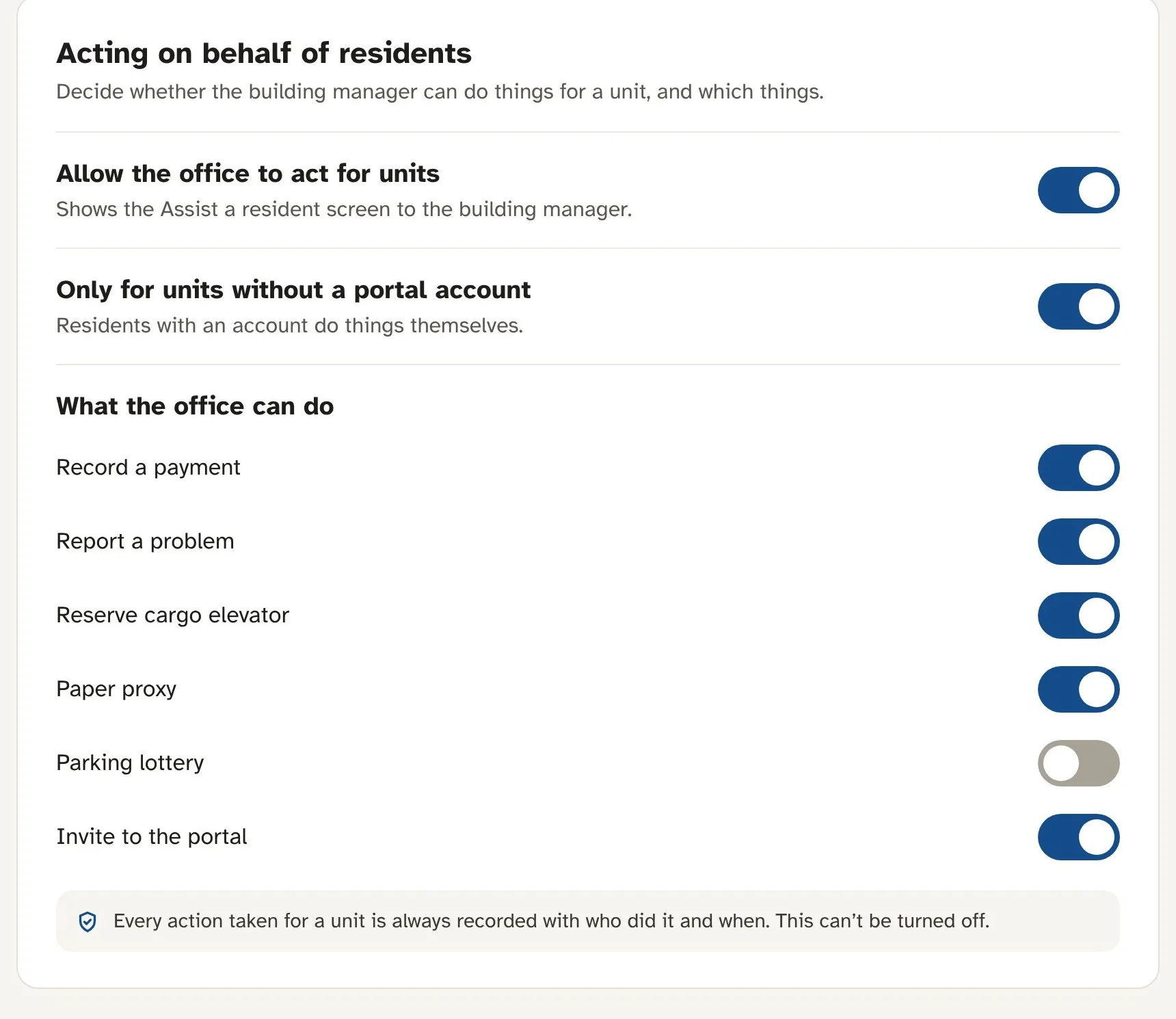
You set the rules for acting on a resident’s behalf.
This is a building setting, not a default you have to live with. The system administrator controls it, and the building manager can only do what you allow.
- Turn it on or off for the whole building
- Limit it to units without a portal account
- Choose exactly which tasks the office can do
- Every action is logged, and logging can’t be turned off
| Typical condo software | Liventry | |
|---|---|---|
| Language | English first; Spanish partial, or only on some screens | Every screen, notice and email in English and Spanish, chosen per person |
| Ease of use | Dense screens designed for office staff | Three text sizes, high contrast and Simple mode |
| Proxies and voting | On paper, in a separate voting tool, or a paid add-on | Online proxies with signature, voting instructions and live quorum, built in |
| Building projects | Tracked by the office; residents hear about them in meetings | Residents see each project’s timeline, budget, updates and how it affects their unit |
| Residents without an account | Handled on paper, outside the system | The office acts for them in Liventry, under rules your building sets, with every action recorded |
| Cargo elevator | Phone calls and a paper calendar at the front desk | Online requests with approval and a shared schedule |
| Parking | Spreadsheets, paper raffles or a separate system | Assigned spots and term-based lotteries with a waitlist, built in |
| Who it serves | Mainly the management office | Owners, tenants, board, administration and staff in one portal |
| Setup and pricing | Custom quote; setup or onboarding fees are common | Published price, free setup by a dedicated specialist, 2 months free |
Live in two weeks. Free for two months.
Your building gets a dedicated onboarding specialist and a 2-month free trial. Week 1, we set everything up. Week 2, we train your team. Then your residents are in.
-
Day 1Sign upTell us about your building. No commitment and no fees.
-
Week 1Your specialist sets it upYour units, owners and starting balances are uploaded for you, free, and checked with you.
-
Week 2Your team gets trainedLive sessions for your building manager, board and staff, in English or Spanish, on the tasks they’ll do every day.
-
Around day 15Launch to residentsInvitations go out by email, with printed letters for anyone who prefers paper.
-
Weeks 3–8Run your building on LiventryPayments, requests, assemblies, parking and the cargo elevator, all free.
-
Day 60DecideKeep Liventry at the published price, or walk away. Nothing to cancel.
Simple pricing that grows with your building.
Everything is included. You pay a base fee for the building plus a fixed amount for each unit.
- Every feature, for every role
- Unlimited administrators and staff accounts
- English and Spanish for every screen
- QuickBooks sync
- Online assemblies and proxies
- A dedicated onboarding specialist who uploads your units, owners and starting balances, then trains your team
2 months free, no commitment. No setup fee. Prices in US dollars, before applicable taxes. Card payment processing fees are charged to the payer.
Questions, answered
Weighted votingCan votes be weighted the way our master deed or bylaws set them?
Yes. Many condominiums give each unit a different share of the vote. In Liventry, the administrator sets weights by column (the same unit position on every floor), by floor, or both multiplied together, and can override any single unit, such as a penthouse or a commercial space. Proxies, votes and results then use those weights automatically.
- Weights by column, by floor, or both
- Overrides for individual units
- Quorum by units or by voting weight: your choice
- Past results show how every item was decided
How does the free trial work?
You get 2 months free, with every feature and no commitment. In week 1, a dedicated onboarding specialist uploads your units, owners and starting balances for free. In week 2, they train your building manager, board and staff. Your residents join right after, and on day 60 you decide: keep Liventry at the published price or simply let the trial end.
What about residents who won’t use the portal?
They’re still part of everything. The building manager can act on behalf of any unit, with or without an account: record a check or cash payment, report a problem, reserve the cargo elevator, register a paper proxy or enter the parking lottery. Each action is recorded with who did it and when, and the resident can be invited to the portal at any time. Your building stays in control: it can turn this off, limit it to units without an account, and choose exactly which tasks the office may do.
Can residents reserve the cargo elevator?
Yes. Owners and tenants choose a day, a start time and an end time, and see what’s already reserved. The administration approves each request and can book time for contractors. Each building sets its own hours, its shortest and longest reservation, and how many cargo elevators it has.
Can we run a lottery for extra parking spots?
Yes. Administration sets the term (3 months, 6 months or a year), opens entries and runs a random draw, with the option to put units that don’t have an extra spot first. Winners and the waitlist are reviewed before publishing, and residents see their result in the portal.
Is it really fully bilingual?
Yes. Every screen, notice and message is available in English and Spanish, and each resident picks their own language. Board announcements can be written in both.
Can older residents use it?
That is what Liventry is designed for: three text sizes, high contrast, large buttons, and a Simple mode that shows only payments, requests and news.
Does it work with our accounting?
Liventry syncs charges and payments with QuickBooks, so the treasurer and the administrator see the same numbers.
How do we set up our building?
A system administrator enters the floors, the units on each floor and where each unit sits, then invites owners, tenants and staff.
How are online proxies handled?
Owners choose a proxy, record voting instructions and sign in the portal. The board sees every proxy and the quorum count as it builds.
See Liventry with your own building.
We’ll walk through payments, assemblies and maintenance using your floors and units.